Skip to content
 Take several payments on one invoice
Big project? Let the balance come in across a few payments — card, check, or a mix — while Fee-Lion keeps a running total of what's left.
Invoices
Partial Payments
Payments
“Pending” vs “Succeeded” Payment States
Why a card payment can show as pending for a moment before it's confirmed — and how to tell when the money is really on its way to you.
Invoices
Payments
Stripe
Send a paid receipt to a client
After a payment lands, send a clean receipt your client can file. Here's where to find it and how to get it to them.
Client Portal
Payments
Receipts
Record a bank transfer or check payment manually
Got paid by wire, ACH, or a paper check outside Fee-Lion? Log it against the invoice so your books and the client's balance both stay right.
Invoicing
Payments
Reconciliation
Take several payments on one invoice
Big project? Let the balance come in across a few payments — card, check, or a mix — while Fee-Lion keeps a running total of what's left.
Invoices
Partial Payments
Payments
“Pending” vs “Succeeded” Payment States
Why a card payment can show as pending for a moment before it's confirmed — and how to tell when the money is really on its way to you.
Invoices
Payments
Stripe
Send a paid receipt to a client
After a payment lands, send a clean receipt your client can file. Here's where to find it and how to get it to them.
Client Portal
Payments
Receipts
Record a bank transfer or check payment manually
Got paid by wire, ACH, or a paper check outside Fee-Lion? Log it against the invoice so your books and the client's balance both stay right.
Invoicing
Payments
Reconciliation
 Apply a collected deposit to the final balance
You took a deposit up front. Here's how that money carries over so the final invoice only asks the client for what's still owed.
Deposits
Invoicing
Payments
Copy and share an invoice’s payment link
Skip the portal tour — grab the direct pay link for any invoice and drop it in an email, a text, or a chat so your client can pay in one tap.
Client Portal
Invoices
Payments
Handle a chargeback or payment dispute
A client's card payment got disputed. Here's what a chargeback means, what Fee-Lion shows you, and how to respond with the evidence you already have.
Disputes
Payments
Stripe
What your client sees right after they pay
The moment a card goes through: a confirmation, a receipt, and a paid invoice.
Client Portal
Payments
Stripe
Apply a collected deposit to the final balance
You took a deposit up front. Here's how that money carries over so the final invoice only asks the client for what's still owed.
Deposits
Invoicing
Payments
Copy and share an invoice’s payment link
Skip the portal tour — grab the direct pay link for any invoice and drop it in an email, a text, or a chat so your client can pay in one tap.
Client Portal
Invoices
Payments
Handle a chargeback or payment dispute
A client's card payment got disputed. Here's what a chargeback means, what Fee-Lion shows you, and how to respond with the evidence you already have.
Disputes
Payments
Stripe
What your client sees right after they pay
The moment a card goes through: a confirmation, a receipt, and a paid invoice.
Client Portal
Payments
Stripe
 How the Portal Works on a Client’s Phone
Most clients approve and pay from a phone. Here's what that experience looks like.
Client Portal
Mobile
Payments
How the Portal Works on a Client’s Phone
Most clients approve and pay from a phone. Here's what that experience looks like.
Client Portal
Mobile
Payments
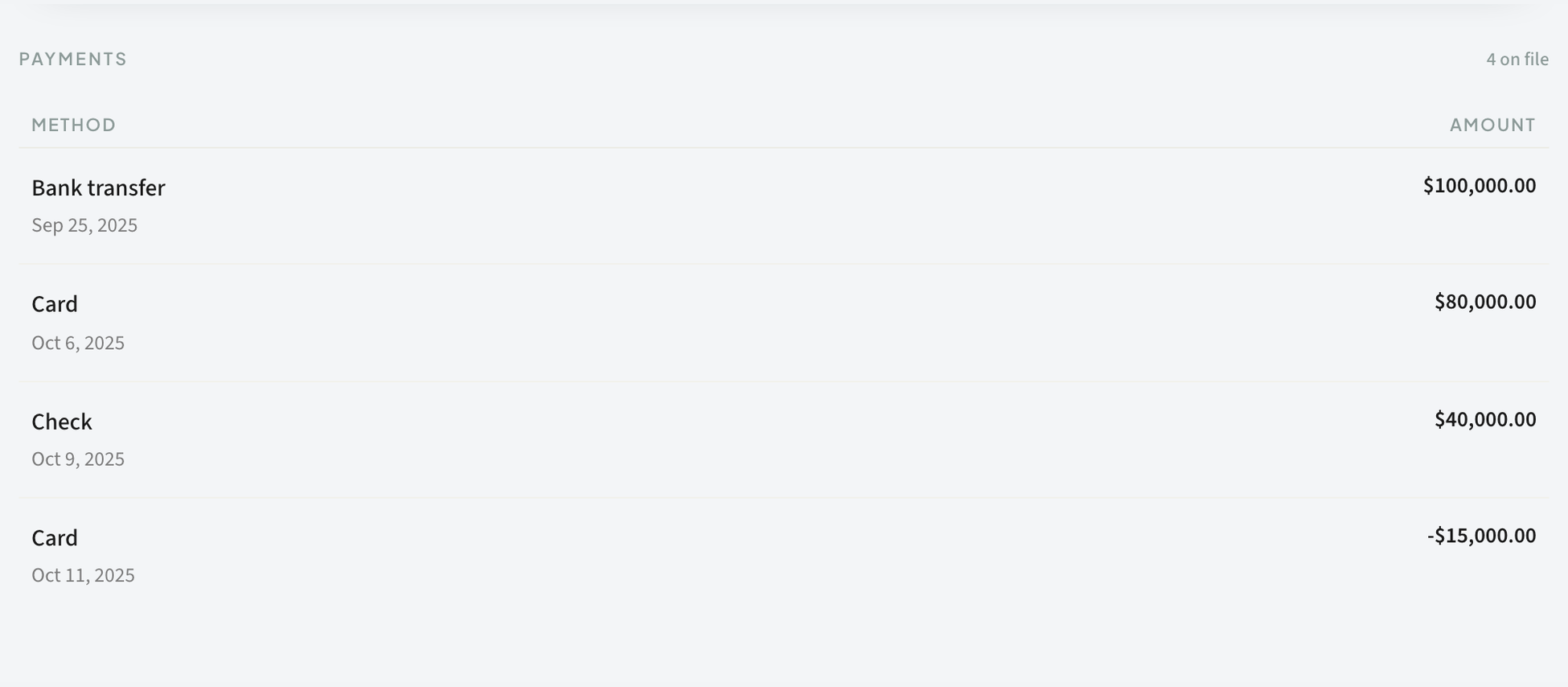 Full Refund or Partial? Choosing the Right One
Decide between refunding everything and refunding part of an invoice, and what each does.
Payments
Refunds
Stripe
Full Refund or Partial? Choosing the Right One
Decide between refunding everything and refunding part of an invoice, and what each does.
Payments
Refunds
Stripe


